Step 1
Open the redemption link
Access https://discord.com/billing/promotions/ and add your code to the end of the link. Example: https://discord.com/billing/promotions/YOUR-CODE
Redeem your codes in the browser.
Step 1
Access https://discord.com/billing/promotions/ and add your code to the end of the link. Example: https://discord.com/billing/promotions/YOUR-CODE
Step 2
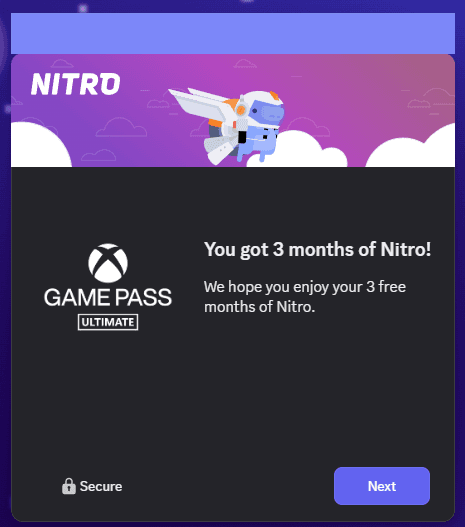
You will be prompted to sign in to proceed with the redemption. Review the product displayed and click "Next" to proceed with the redemption.
Step 3
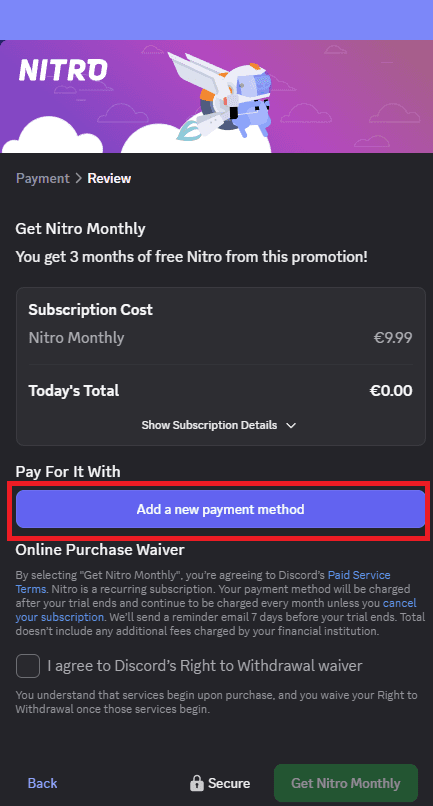
To complete the redemption of the test, a valid payment method is required.
Step 4
Confirm the data. A value of US$ 0.99 may be charged and refunded immediately for verification. The test subscription will be activated on your account.
Account eligibility:The test can only be activated on accounts with more than one month and that have never had an active subscription.
Verification charge:After the redemption, a charge of US$ 0.99 may occur, which is refunded immediately.
Automatic renewal:When the test period ends, the subscription will be renewed automatically. If you do not want to continue, cancel the recurrence in the subscription settings in Discord after redeeming.